Concept project
Vue 3 Admin Panel with Role-based Access and Pinia
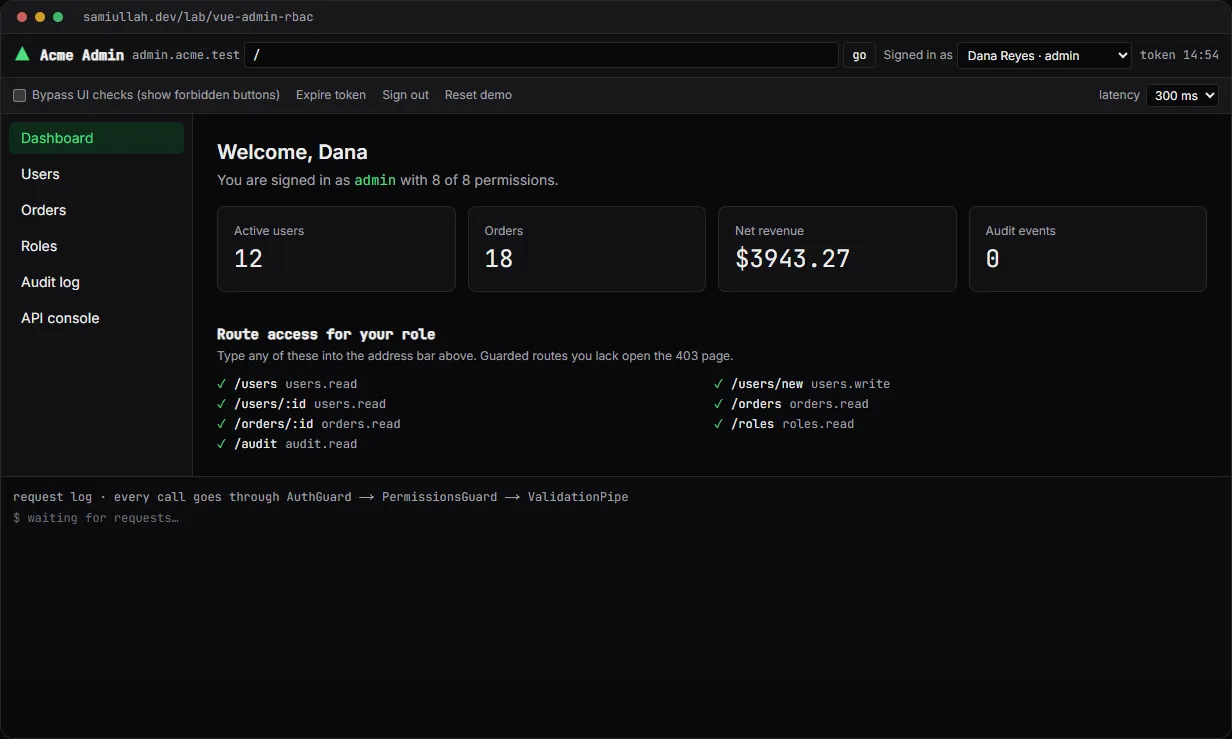
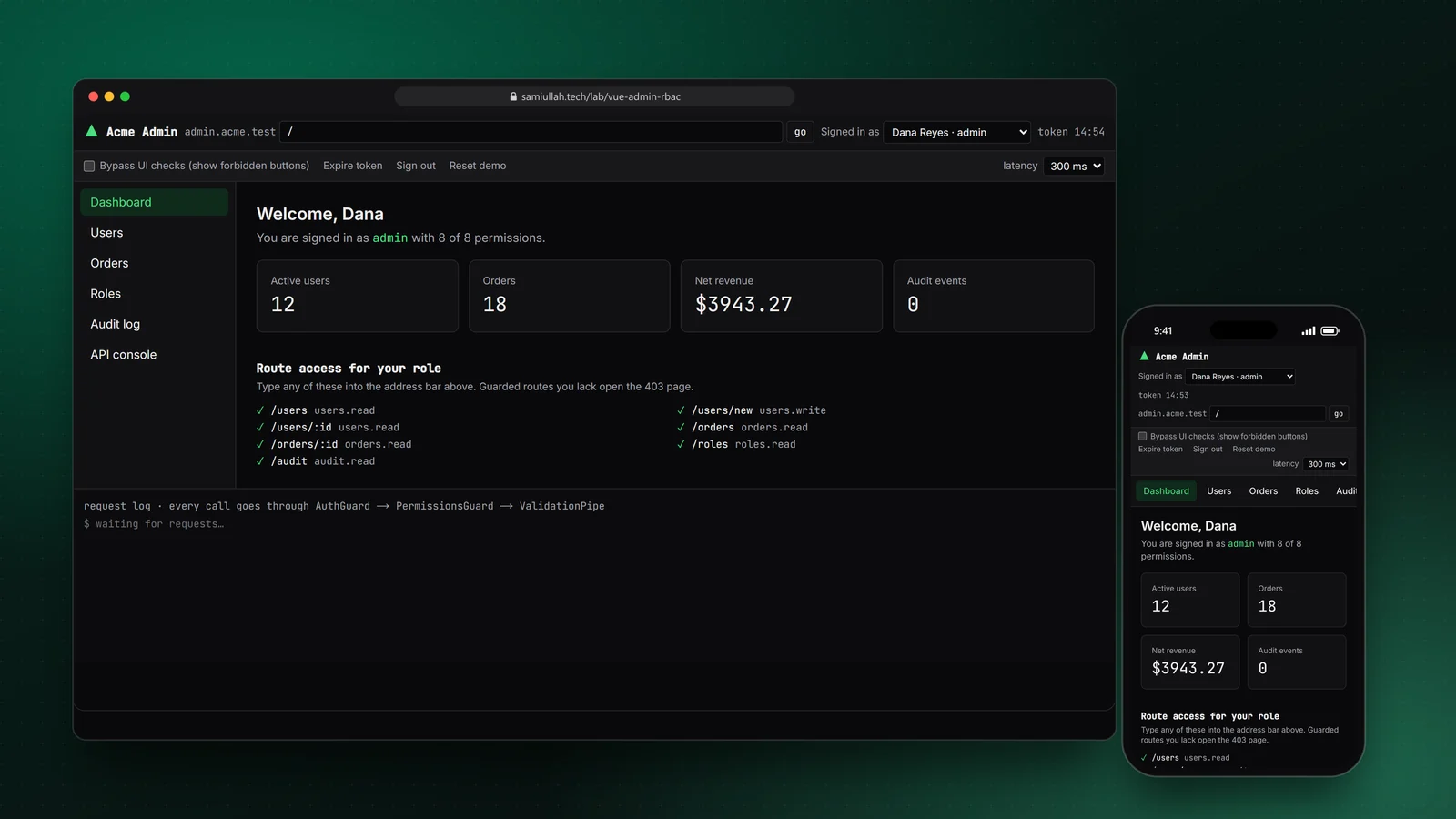
A concept project with a working demo: a Vue 3 and Pinia admin panel where routes, menus and buttons follow fine-grained permissions, and a mock API enforces the same rules on its own. Switch between Admin, Manager and Viewer, edit the role matrix, expire the token and read the audit trail. It shows how I structure access control in a Vue front end.
Overview#
Most admin panels start with if (user.isAdmin) sprinkled through the templates. It works for a month. Then a "Manager" role arrives that can refund orders but not delete users, and every one of those checks has to be found and rewritten.
This concept shows the structure I use instead: permissions are defined once as typed strings, every route, menu item and button asks for a permission (never a role), and the API checks the same permissions again on its own. The live demo is real Vue 3 and Pinia code mounted inside this Next.js site, with a mock API that behaves like a NestJS service.
My role#
Everything: the permission model, the guard, the Pinia stores, the v-can directive, the mock API pipeline, the interface and this write-up. It is a concept project, not client work. The users and orders are fictional seed data.
The problem#
An admin panel has to answer one question in many places: "may this person do this?"
- Routes. A Viewer who types
/users/newinto the address bar must not see the create form. - Navigation. Menu items for pages you cannot open are noise, and they leak what the system can do.
- Actions. Inside a page you can read, some buttons are still off-limits: a Manager can edit users but not deactivate them.
- The server. Hiding a button is a UX feature, not security. Anyone can open dev tools and send the request. The API must refuse by itself, and someone should be able to see later that it did.
When those four checks are written separately, they drift. The goal is one source of truth that all four read.
Approach & architecture#
- Address bar or linkthen
- router storethen
- guardNavigation()then
- page | /login (remember path) | 403 page
- Role switch or matrix editthen
- guard result recomputedthen
- menu and current page update
- Pinia store actionthen
- api()then
- AuthGuardthen
- PermissionsGuardthen
- ValidationPipe (zod)then
- handlerthen
- audit log
- api()then
- 401then
- sign out, keep return paththen
- loginthen
- back to the same page
Permissions as typed strings. The list is a const tuple, so a typo like user.write fails to compile.
export const PERMISSIONS = [
  "users.read", "users.write", "users.deactivate",
  "orders.read", "orders.refund",
  "roles.read", "roles.manage", "audit.read",
] as const;
export type Permission = (typeof PERMISSIONS)[number];
export type RoleMatrix = Record<RoleId, Permission[]>;
One guard function. Routes declare permission in their definition, like meta.permission in Vue Router. The guard is a pure function, so it is easy to test and the same function decides both navigation and the "route access" list on the dashboard.
export function guardNavigation(path: string, ctx: { authenticated: boolean; has: (p: Permission) => boolean }): GuardResult {
  const match = matchRoute(path);
  if (!match) return { kind: "notfound", path };
  if (match.route.public) return { kind: "ok", match };
  if (!ctx.authenticated) return { kind: "login", redirect: match.path };
  const needed = match.route.permission;
  if (needed && !ctx.has(needed)) return { kind: "forbidden", from: match.path, needed };
  return { kind: "ok", match };
}
In the router store the guard result is a computed. That detail matters: when you switch role or remove a permission from your own role, the current page is re-checked straight away, with no reload and no navigation event.
v-can and useCan(). Buttons use a directive; script logic uses the composable. The directive runs a watchEffect, so it reacts to role changes even when the component itself does not re-render.
// <button v-can="'users.deactivate'">  hides
// <button v-can:disable="'orders.refund'">  disables with a reason
export const vCan: Directive<CanEl, Permission> = {
  mounted(el, binding) {
    el.__canStop = watchEffect(() => apply(el, binding));
  },
  updated(el, binding) {
    apply(el, binding, true);
  },
  unmounted(el) {
    el.__canStop?.();
  },
};
The API does not trust the UI. The mock API runs the same order a NestJS controller would: AuthGuard, then a PermissionsGuard reading @RequirePermission() metadata, then a zod validation pipe, then the handler. It checks the role matrix stored on the "server", not the client's copy. Denied writes are written to the audit log. In the production design the guard looks like this:
@Injectable()
export class PermissionsGuard implements CanActivate {
  constructor(private reflector: Reflector, private roles: RolesService) {}
  async canActivate(ctx: ExecutionContext) {
    const needed = this.reflector.get<Permission>(PERMISSION_KEY, ctx.getHandler());
    if (!needed) return true;
    const { user } = ctx.switchToHttp().getRequest();
    return this.roles.has(user.role, needed); // cached per role, invalidated on PUT /roles/:role
  }
}CREATE TABLE role_permissions (
role text NOT NULL,
permission text NOT NULL,
PRIMARY KEY (role, permission)
);
CREATE TABLE audit_log (
id bigserial PRIMARY KEY,
at timestamptz NOT NULL DEFAULT now(),
actor_id bigint NOT NULL REFERENCES users(id),
action text NOT NULL,
target text NOT NULL,
outcome text NOT NULL CHECK (outcome IN ('ok', 'denied', 'conflict'))
);Key challenges#
- Proving the server check works. A demo that only hides buttons proves nothing. The "bypass UI checks" switch renders the forbidden buttons with a dashed outline, and the API console sends any request as the current user. Both get a real 403, an optimistic update that rolls back, and an audit entry.
- Lock-out protection. If an admin can edit the role matrix, they can remove their own
roles.manage. The API refuses that change with a 422, and the matrix shows those boxes as locked. - Token expiry without losing work. A 401 from any call signs the user out and stores the page they were on. After sign-in they land back on it, the same flow an Axios interceptor handles in a production app.
- Double submits on money. Refunds send an
Idempotency-Key. Tick "simulate a double click" and the second request is answered from the stored response, so the order is refunded once. - Running Vue inside Next.js. The demo mounts a Vue app from a small React component. Components use template strings compiled in the browser, which needs Vue's full build. I import that build once, and every component imports plain
vue.
Tech stack#
- Demo: Vue 3 (Composition API,
defineComponentwith templates), Pinia setup stores, TypeScript, zod for request validation, Tailwind CSS. A small router store stands in for Vue Router. It is mounted in this Next.js site through a React island, and state is kept inlocalStorage. - Production design: Vue 3 single-file components built with Vite, Vue Router with the same guard in
router.beforeEach, Pinia, and a NestJS API with guards, a validation pipe and an audit interceptor. Data in PostgreSQL, idempotency keys and the role cache in Redis.
Results#
- A working admin panel with users (list, search, create, edit, deactivate), orders (list, detail, partial and full refunds), a permission matrix, an audit log with CSV export, and an API console.
- Three demo roles with clearly different access. Typing a guarded URL as a Viewer opens the 403 page, which names the missing permission.
- Menus, buttons and the current page update the moment the role or the matrix changes.
- Every request is shown in a request log with the guard steps it passed or failed.
- All the code under "View source" on the demo page is the code that runs.
This is a concept build without real users, so there are no usage or performance figures.
Try the demo#
Open the Vue admin panel demo. Things to try:
- Switch to Lena Park (viewer), then type
/users/newin the address bar and press go. - As Omar Siddiqui (manager), turn on "Bypass UI checks" and press deactivate on a user. Watch the optimistic change roll back and the 403 in the request log.
- As Dana Reyes (admin), untick
orders.readfor admin in Roles. The Orders menu item disappears straight away. - Press "Expire token", then click any page. Sign in again and you return to where you were.
What I would do next#
- Rebuild it as a Vite project with
.vuefiles and Vue Router, and add Vitest tests for the guard,useCan()and every API status code. - Add record-level rules, for example "managers can refund only orders from their region", which need a policy function per resource, not just a permission string.
- Stream audit events to a separate append-only store so an admin cannot edit them.