Concept project
Vue 3 Property Listing with Filters and Leaflet Map
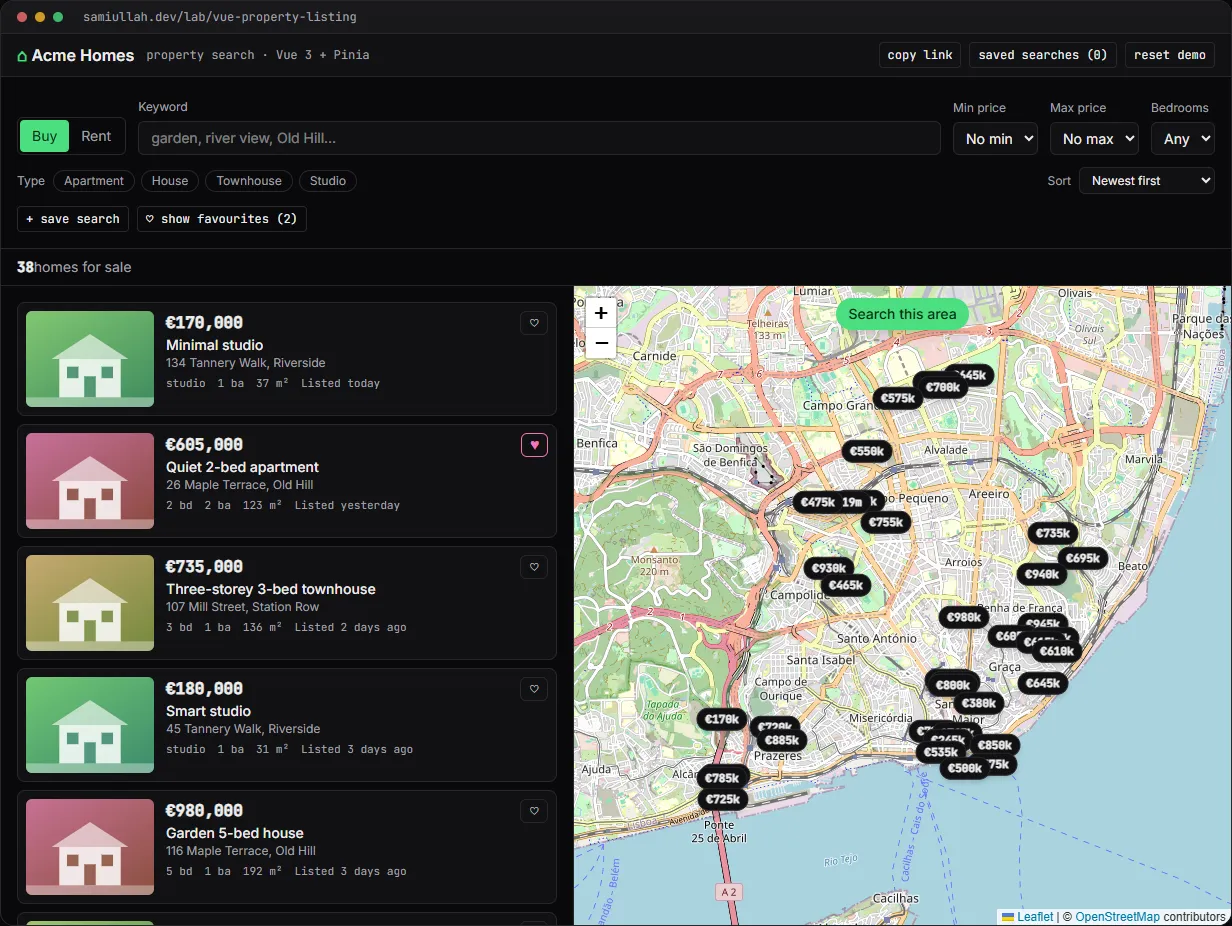
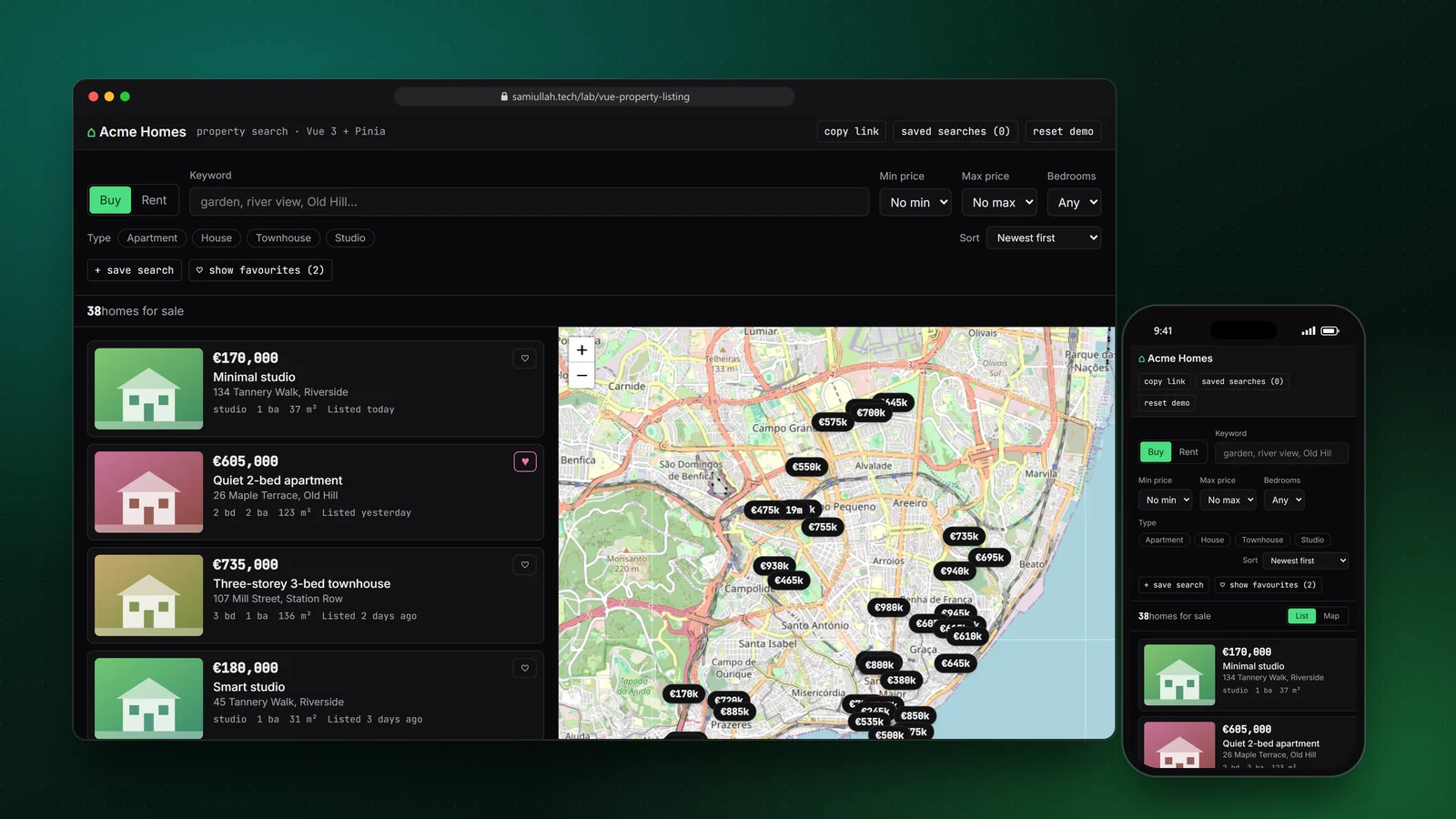
A concept project with a working demo: a property search page in Vue 3 and Pinia where price, bedroom, type and keyword filters drive a results list and a Leaflet map that stay in sync. It has search this area, saved searches, favourites, shareable URLs and a detail view. Listings are generated, not real properties.
Overview#
The search page is the most used screen on any real estate portal. People change a filter, glance at the map, hover a card to see where it is, drag the map to another street and try again. If the list and the map ever disagree, they stop trusting the site.
I built this concept to show how I structure that page in Vue. The live demo is real Vue 3 and Pinia code, mounted inside this Next.js site, with a Leaflet map on OpenStreetMap tiles.
My role#
Everything: the data model, the filter and URL logic, the Pinia store, the Vue components, the map integration and this write-up. It is a concept project. The 60 listings, street names and district names are generated and fictional; only the map tiles show a real place.
The problem#
A listing search has three views of the same data: the result list, the result count and the pins on the map. On top of that there are three kinds of state that all need to survive a reload:
- Search state: deal type, price range, bedrooms, property types, keyword, sort and an optional map area.
- User state: favourites and saved searches.
- Interaction state: which card is hovered, which pin is selected, which detail is open.
The common failure is letting each view keep its own copy. The map filters its own markers, the list filters its own rows, and one day a bug makes them differ. The second failure is a URL that does not describe the search, so a link sent to a partner opens a blank page.
Approach & architecture#
- Filter inputsthen
- Pinia store (filters, sort)then
- computed resultsthen
- list + count + map pins
- Pinia storethen
- toQuery()then
- URL hash + localStorage
- URL hashthen
- fromQuery()then
- Pinia store
- Card hoverthen
- store.hoveredIdthen
- pin restyled
- Pin hoverthen
- store.hoveredIdthen
- card highlighted
- Pin clickthen
- store.selectedIdthen
- card scrolled into view
Plain functions, thin store. All the domain logic lives in listings.ts, which has no Vue imports: seeding, filtering, sorting, validation, query-string serialisation, distance maths. The Pinia store only holds state and wires those functions into getters. That split means the same filter function could run in a Nuxt server route.
export function filterListings(all: Listing[], f: Filters): Listing[] {
  const q = f.q.trim().toLowerCase();
  return all.filter(
    (l) =>
      l.deal === f.deal &&
      (f.types.length === 0 || f.types.includes(l.type)) &&
      (f.minPrice === null || l.price >= f.minPrice) &&
      (f.maxPrice === null || l.price <= f.maxPrice) &&
      l.beds >= f.minBeds &&
      (!q || `${l.title} ${l.street} ${l.district} ${l.features.join(" ")}`.toLowerCase().includes(q)) &&
      (!f.bbox || inBBox(l, f.bbox)),
  );
}
One getter feeds every view. results is a single computed in the store. The list renders it, the count reads its length, and the map component watches the joined ids to redraw pins and refit the bounds. Saved searches reuse the same function to show how many listings each one matches right now.
The URL describes the search. toQuery() turns filters and sort into a short query string and drops defaults, so a plain search has a clean URL. It is written to the hash with history.replaceState, which keeps the back button clean and keeps the host Next.js router out of it. fromQuery() reads it back and falls back to defaults for any unknown or broken value instead of throwing.
Search this area. When the user drags or zooms, a button appears. Pressing it stores the map bounds as a bbox filter in [south, west, north, east] order and draws a dashed rectangle. In the production design that becomes a PostGIS query:
SELECT id, title, price, beds, ST_Y(geom) AS lat, ST_X(geom) AS lng
FROM listings
WHERE deal = $1
  AND price BETWEEN $2 AND $3
  AND beds >= $4
  AND geom && ST_MakeEnvelope($5, $6, $7, $8, 4326)
ORDER BY listed_at DESC
LIMIT 50;
-- with: CREATE INDEX listings_geom_gix ON listings USING gist (geom);
Key challenges#
- Leaflet inside Vue reactivity. If the map or markers end up inside a
ref, Vue wraps every internal Leaflet object in a proxy, which is slow and can break identity checks. The map component keeps Leaflet in plain closure variables and only reads the store. - Hover without flicker. My first version replaced the marker icon on hover. Replacing the element under the cursor fires
mouseout, which clears the hover, which replaces the icon again. The fix is to swap CSS classes on the existing pin element and raise its z-index. - Programmatic moves versus user moves. Fitting the map to new results also fires
moveend, which would show "Search this area" after every filter change. Aprogrammaticflag set beforefitBoundsandpanTotells the two apart. - A hidden map on mobile. On small screens the list and map are toggled. Leaflet measures its container once, so a map created while hidden renders grey tiles. A
ResizeObservercallsinvalidateSize()whenever the container changes size. - Price ranges across sale and rent. A €450,000 maximum makes no sense for rentals, so switching deal type clears the price range, and the store reports an inline error if the minimum is above the maximum.
Tech stack#
- Demo: TypeScript, Vue 3 (Composition API, components written with
defineComponentand template strings compiled in the browser), Pinia, Leaflet with OpenStreetMap tiles. The Vue app is mounted inside a React client component on this Next.js site. State persists inlocalStorage. - Production design: Nuxt 3 so listing and detail pages render on the server, Pinia for the same store, Leaflet with marker clustering, and an API over PostgreSQL with PostGIS for bounding-box and distance queries. See geospatial work for more map projects.
Results#
- A working search page with filters, sort, keyword search, map-area search, favourites, saved searches with live match counts, a shareable link and a detail view with a gallery, mortgage or move-in estimate, a location map and the three closest similar listings.
- The list, the count and the pins are always derived from one getter, so they cannot disagree.
- Reloading the page or opening a copied link restores the same search, because the URL hash and storage hold the full query.
- The code under "View source" on the demo page is the code that runs.
This is a concept build with generated data and no real users, so there are no traffic or conversion numbers to report.
Try the demo#
Open the property listing demo. Things to try:
- Hover a few cards and watch their price pins light up, then click a pin and watch the list scroll to its card.
- Drag the map to one district, press Search this area, then press + save search.
- Press copy link, open it in a new tab and check the same filters and area come back.
- Open a listing, change the deposit or rate in the mortgage estimate, and use the arrow keys to browse the photos.
What I would do next#
- Move the filter function behind a Nuxt server route backed by PostGIS and paginate the results.
- Add marker clustering for city-wide zoom levels with thousands of listings.
- Add a draw-a-polygon search using
ST_Withininstead of a rectangle. - Write Vitest unit tests for
toQuery/fromQueryround trips and the filter edge cases.