Concept project
URL Shortener with Click Analytics
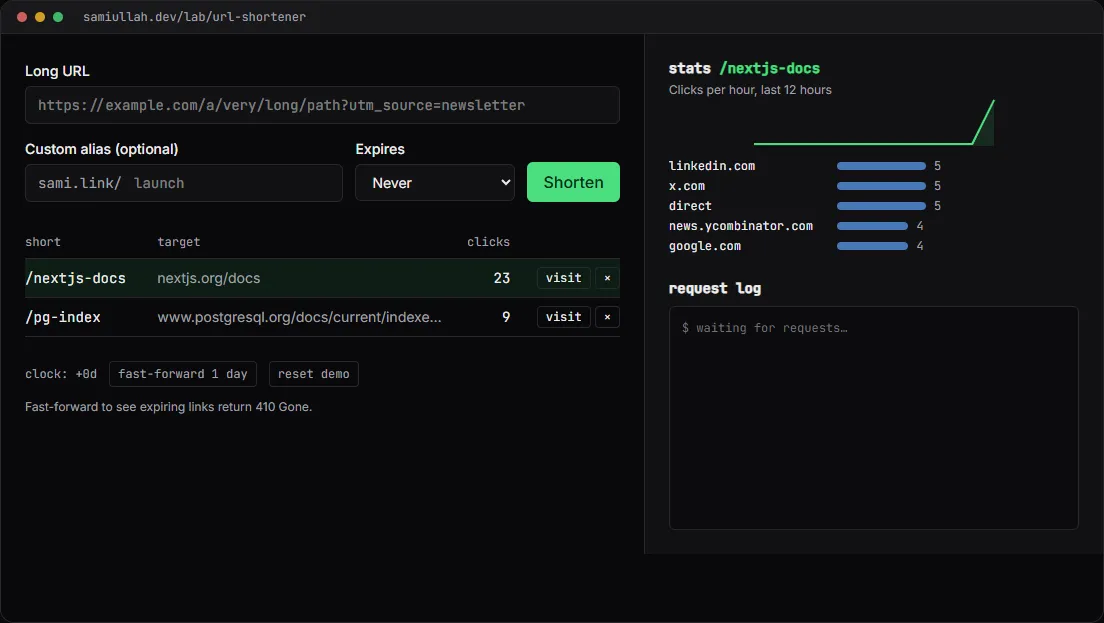
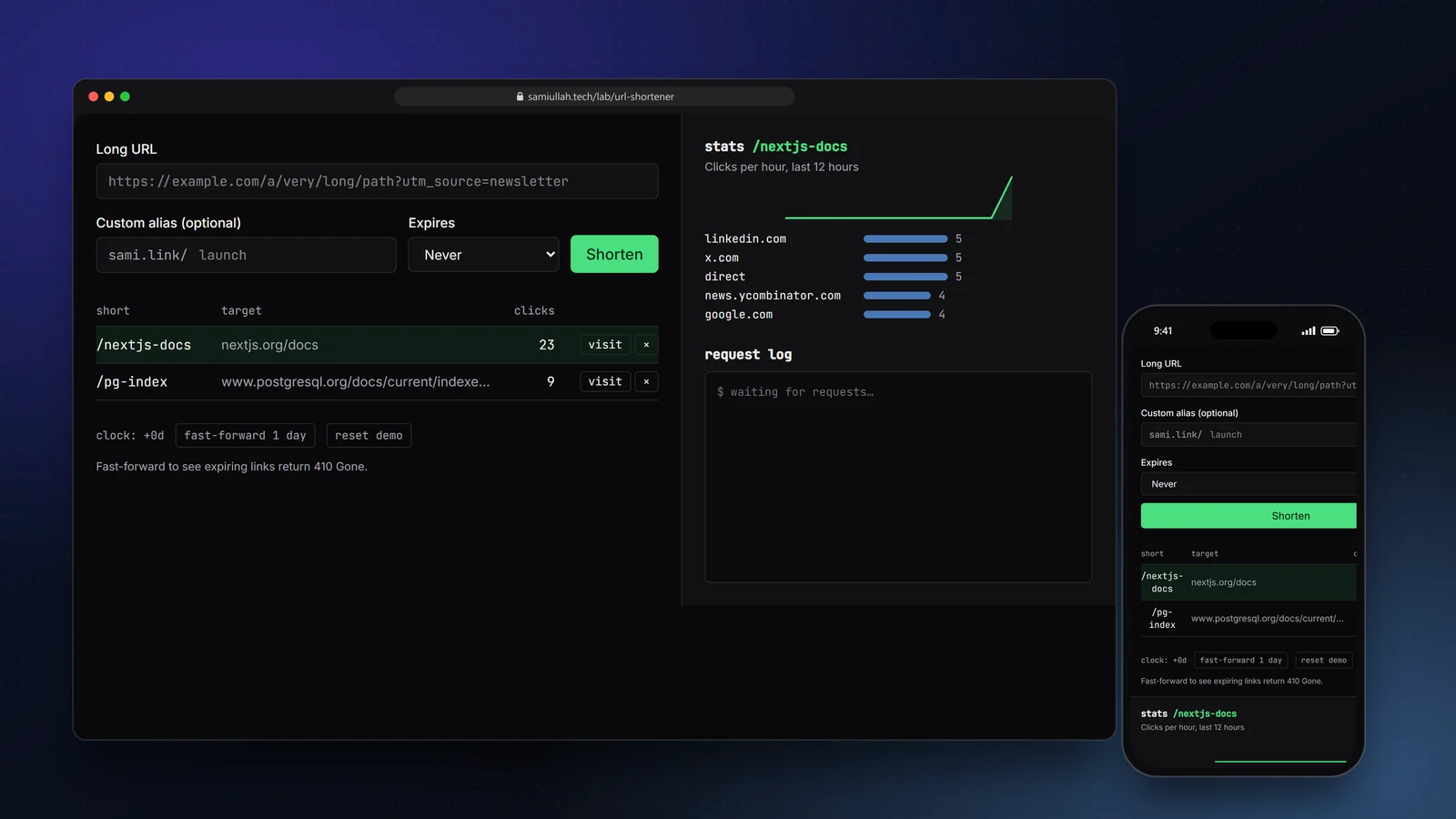
A concept project with a working demo: a URL shortener that creates collision-free base62 codes, accepts custom aliases, expires links with 410 Gone and reports clicks per hour and per referrer. The demo runs in the browser; the case study explains the Express.js and PostgreSQL design it mirrors.
Overview#
A link shortener looks like a weekend project, but it touches most of what a real backend needs: input validation, unique constraints, the right HTTP status codes, a hot read path that must stay fast, and reporting queries over a table that only grows.
I built this concept to show how I think about those parts. The live demo runs entirely in your browser, and every request it makes is written to a request log so you can see the API behaviour, not just the UI.
My role#
Everything: the API design, the code-generation scheme, the validation rules, the demo interface and this write-up. It is a concept project, not client work, and the numbers in the demo come from your own clicks.
The problem#
A shortener has two very different workloads:
- Writes are rare and need to be correct. Two people must never get the same code, custom aliases must not clash regardless of case, and links must not point back at the shortener (that creates redirect loops).
- Reads are constant and need to be fast.
GET /:codeis the whole product for visitors. Anything slow on that path, such as writing click analytics synchronously, is felt on every click.
On top of that, the owner of a link wants to know who clicked and from where, which means aggregation queries that stay cheap as the clicks table grows.
Approach & architecture#
- Clientthen
- POST /api/linksthen
- zod validationthen
- INSERT links (unique lower(code))then
- 201 + short URL
- Visitorthen
- GET /:codethen
- SELECT by code (index)then
- 301 Location
- GET /:codethen
- enqueue clickthen
- batched INSERT clicks
Codes from ids, not random strings. Each link gets an auto-incrementing id. Encoding the id directly in base62 would leak how many links exist (/1, /2, /3), so the id is first scrambled with a multiplicative hash modulo the prime 2³¹−1. That mapping is reversible and collision-free, so there is no "generate, check, retry" loop.
const PRIME = 2_147_483_647; // 2^31 - 1
const MULT = 48_271;
export const scramble = (id: number) => Number((BigInt(id) * BigInt(MULT)) % BigInt(PRIME));
// base62(scramble(1001)) -> a 5–6 character code, unique by construction
Aliases share the table. A custom alias is just a code the user picked. A unique index on lower(code) makes "Launch" and "launch" the same, and the database, not application code, is the final judge: a duplicate insert fails with error 23505, which the API maps to 409 Conflict.
CREATE TABLE links (
  id          bigserial PRIMARY KEY,
  code        text NOT NULL,
  target      text NOT NULL,
  expires_at  timestamptz,
  created_at  timestamptz NOT NULL DEFAULT now()
);
CREATE UNIQUE INDEX links_code_lower ON links (lower(code));

CREATE TABLE clicks (
  link_id   bigint NOT NULL REFERENCES links(id) ON DELETE CASCADE,
  at        timestamptz NOT NULL DEFAULT now(),
  referrer  text
);
CREATE INDEX clicks_link_at ON clicks (link_id, at);
Status codes that mean something. Valid links answer 301. Expired links answer 410 Gone, which tells search engines the removal was intentional, rather than 404. Validation errors are 422, alias clashes 409.
Key challenges#
- Keeping the redirect fast. The click is recorded after the redirect decision. In the production design the handler pushes the click to an in-memory buffer that flushes as one multi-row insert every second, so a burst of traffic becomes a few inserts instead of thousands.
- Case-insensitive uniqueness. Checking in application code and then inserting has a race window. The functional unique index closes it.
- Reporting over a growing table. Per-hour and per-referrer stats filter on
(link_id, at), which the composite index serves as a range scan. The demo'sclicksByHourfunction is the in-memory version of the samedate_trunc('hour', at)grouping. - Unsafe targets. Only
httpandhttpsURLs with a real domain are accepted, and links to the shortener's own host are refused to prevent loops.
Tech stack#
- Demo: TypeScript, React and Next.js. The core logic lives in a framework-free module (
shortener.ts) so it reads like the server code it stands in for. State is kept inlocalStorage. - Production design: Node.js with Express.js for the two hot routes, PostgreSQL for links and clicks, zod for request validation.
Results#
- A working demo covering create, alias conflicts, redirects, expiry, deletion and stats, with every API response shown in a request log.
- Codes are unique by construction: no retry loop and no lookup before insert.
- The code you can read under "View source" on the demo page is the code that runs; nothing is mocked behind the UI.
There are no traffic or performance numbers here because this is a concept build, not a deployed service with users.
Try the demo#
Open the URL shortener demo. Things to try:
- Create a link with the alias
nextjs-docs. It already exists, so you get the 409 message. - Press visit a few times on one link and watch the sparkline and referrer bars.
- Create a link that expires in 1 day, then press fast-forward 1 day and visit it again:
410 Gone.
What I would do next#
- Move the logic behind real Express.js routes with Supertest integration tests against a PostgreSQL test database.
- Add per-API-key rate limiting on link creation.
- Store a hashed IP per click to report unique visitors without keeping personal data.