Concept project
Job Queue and Background Workers with NestJS and BullMQ
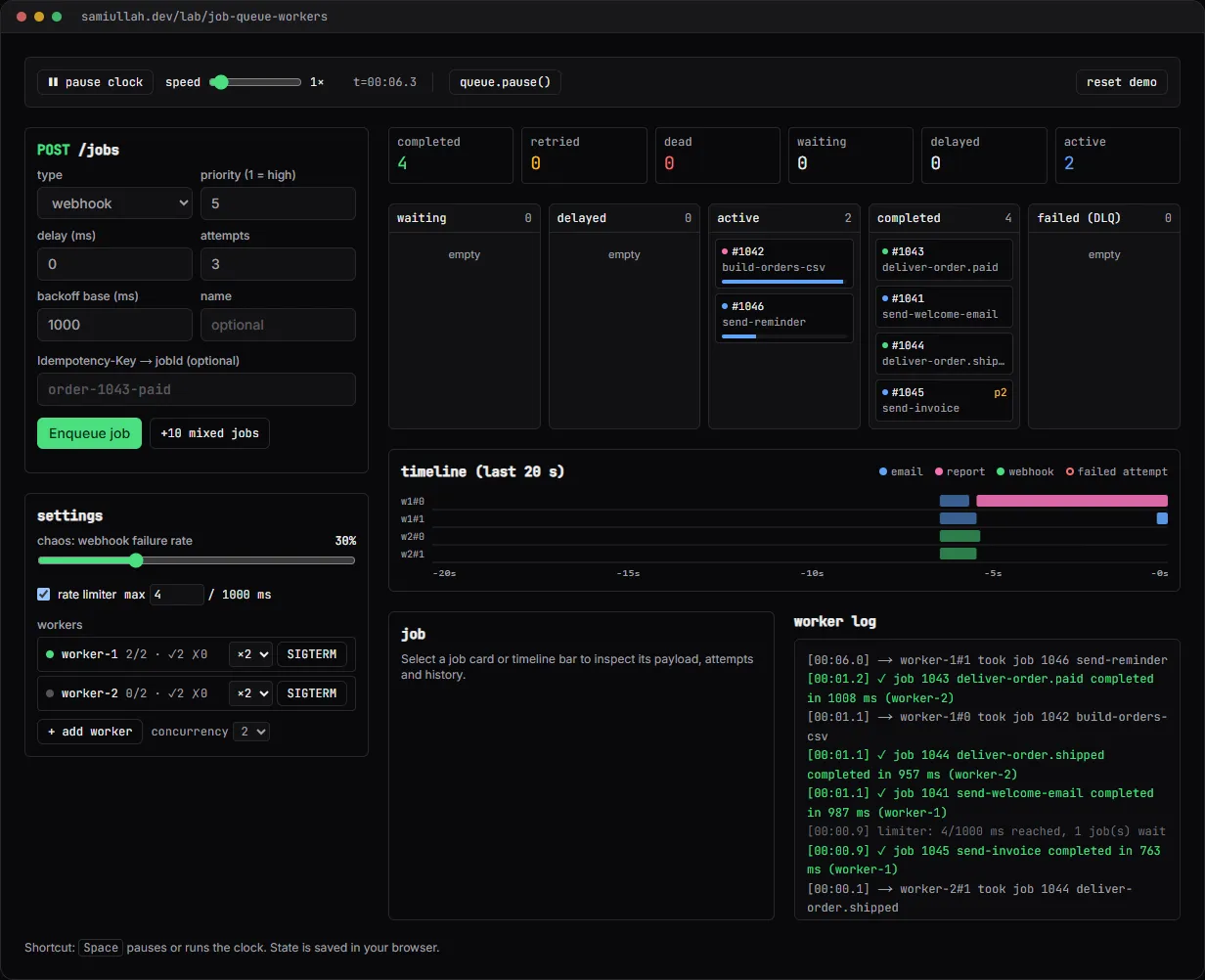
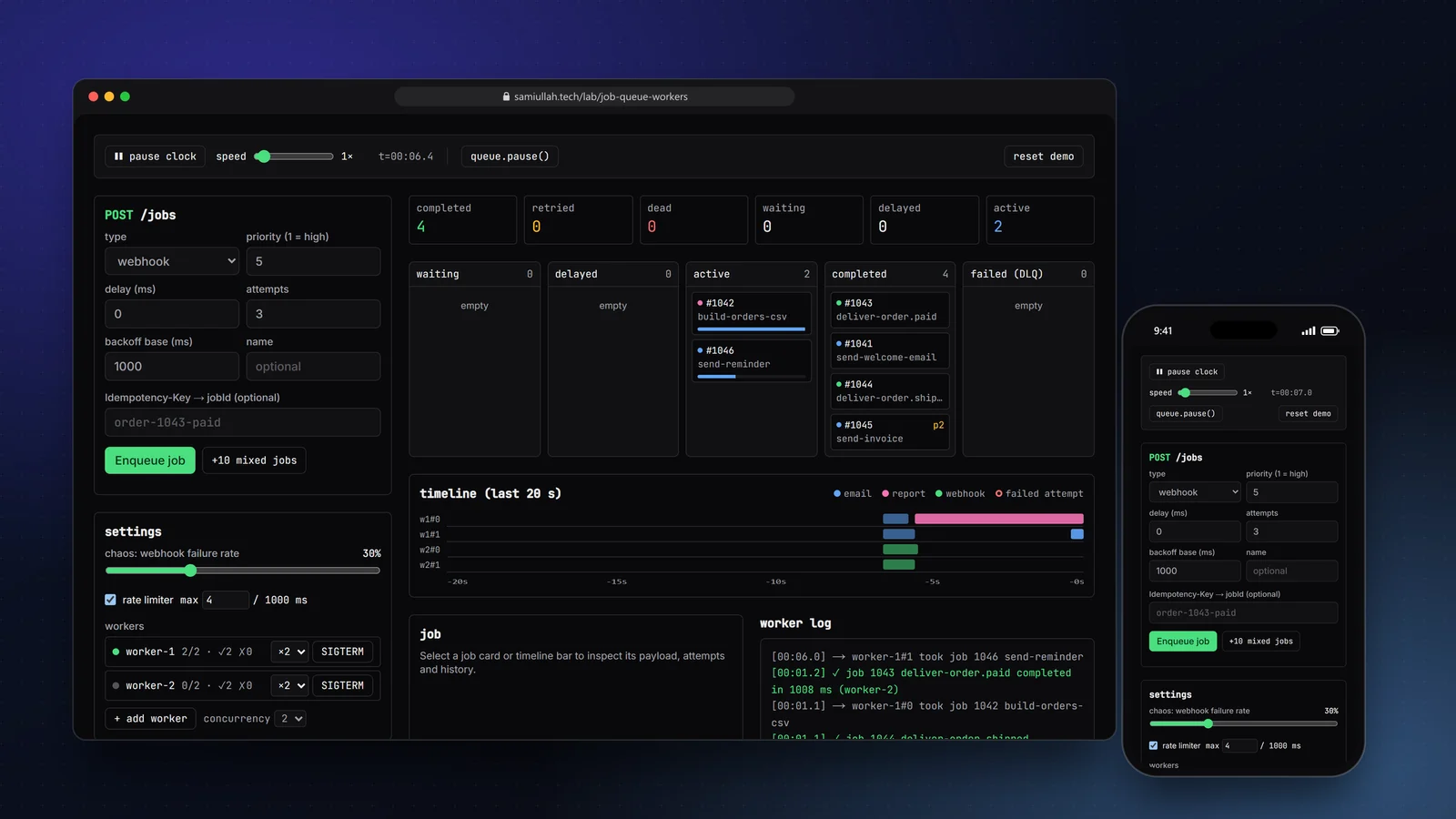
A concept project with a working demo: a simulated BullMQ queue with workers, priorities, delayed and repeat jobs, exponential backoff, a rate limiter, idempotent job ids, graceful shutdown and a failed set you can retry from. The demo runs in the browser; the case study explains the NestJS, BullMQ and Redis design it mirrors.
Overview#
Most slow things an API does should not happen inside the request: sending email, building a report, calling someone else's webhook. The usual fix is a queue. The API writes a job and answers 202 Accepted, and a separate worker process does the slow part and retries it when it fails.
Queues are easy to add and hard to reason about. When a job fails, when does it run again? What happens to a job that is running when you deploy? What stops a retry storm from flattening a partner's server? I built this concept to make those answers visible. The live demo runs a simulated queue in your browser and draws every attempt on a timeline.
My role#
Everything: the queue rules, the simulation module, the dashboard UI and this write-up. It is a concept project, not client work. The job counts and failures you see come from the simulation and your own clicks.
The problem#
A background job system has to answer a handful of questions well:
- Order. Which job runs next? Urgent jobs (an invoice email) must jump ahead of bulk ones (a monthly report) without starving them.
- Failure. A webhook receiver that is down should be retried, but not every 100 ms. Retries need to spread out, and they need to stop.
- Duplicates. A user double-clicks, or a client retries a timed-out request. That must not send two emails.
- Pressure. A worker pool can easily send more requests than a downstream service accepts. Something has to cap the rate.
- Deploys. Stopping a worker must not lose the job it is holding or run it twice.
Approach & architecture#
- Clientthen
- POST /jobsthen
- NestJS controllerthen
- queue.add (jobId = idempotency key)then
- 202 + jobId
- Redis waiting setthen
- worker (concurrency n)then
- processorthen
- completed
- processorthen
- throwsthen
- delayed (backoff)then
- waiting
- delayedthen
- attempts exhaustedthen
- failed setthen
- manual retry
The demo's queue.ts is a pure state machine that follows BullMQ's rules. Every call takes the queue state and returns a new one, so the whole queue fits in localStorage and the UI only renders it. The UI calls tick(state, dt) every 100 ms; the speed slider just makes dt larger.
Each tick does the same five steps a real worker loop does: fire due repeat jobs, promote delayed jobs whose time has come, advance active jobs, close workers that finished draining, and fill free worker slots. Picking is by priority and then insertion order:
const waiting = s.jobs
  .filter((j) => j.state === "waiting")
  .sort((a, b) => a.priority - b.priority || a.order - b.order);
A failed attempt goes back to delayed with exponential backoff, so the wait doubles each time:
export const backoffDelay = (baseMs: number, attemptsMade: number) =>
  baseMs * 2 ** Math.max(0, attemptsMade - 1);
// base 1000 ms: 1 s, 2 s, 4 s, 8 s ... then the failed set
In the production design the same rules come from BullMQ options rather than my code. The NestJS controller uses the client's Idempotency-Key header as the job id, and BullMQ ignores an add with an id that already exists:
// In the production design (NestJS + @nestjs/bullmq)
@Post("jobs")
@HttpCode(202)
async enqueue(@Body() dto: EnqueueDto, @Headers("idempotency-key") key?: string) {
  const job = await this.webhooks.add(dto.name, dto.data, {
    jobId: key,
    priority: dto.priority,
    delay: dto.delayMs,
    attempts: 5,
    backoff: { type: "exponential", delay: 1000 },
    removeOnComplete: 1000,
  });
  return { jobId: job.id };
}
The worker is a separate Nest app with limiter: { max: 4, duration: 1000 } on the webhook queue and enableShutdownHooks(), so SIGTERM calls worker.close(), which waits for active jobs. Outcomes are written to a PostgreSQL job_runs table for auditing, because Redis keeps only recent history.
Key challenges#
- Making time controllable. A queue is about time: delays, backoff, rate windows. Using real timers would make the demo slow and hard to test. A simulated clock (
state.now) advanced bytickmakes every rule deterministic, and the seeded random generator lives in the state too, so a saved queue continues the same way after a reload. - Limiter across all workers. The limit is per queue, not per worker. The simulation keeps a list of recent start times and refuses to start a job when the last second already has
maxstarts. Turn it off in the demo and push 10 jobs to see the difference on the timeline. - Graceful shutdown. A
SIGTERM'd worker is markeddraining. It takes no new jobs and is removed only after its last active job completes or fails, which is exactly the guarantee BullMQ gives through job locks. - Failures that look real. Failing attempts stop at 60% of their run time with a reason such as
ETIMEDOUTorReceiver answered 503, so the timeline shows short red-edged bars followed by gaps that get longer.
Tech stack#
- Demo: TypeScript, React and Next.js. The queue logic lives in a framework-free module (
queue.ts); the dashboard and SVG timeline are plain React with no chart library. State is saved inlocalStorage. - Production design: NestJS with
@nestjs/bullmq, BullMQ on Redis, worker processes on Node.js, PostgreSQL for report data and job audit rows, Bull Board for operators.
Results#
- A working simulation covering priorities, delayed jobs, a repeat job every 30 simulated seconds, retries with exponential backoff, a failed set with manual retry, idempotent job ids, a shared rate limiter, pause and resume, and graceful worker shutdown.
- Every attempt is drawn on a 20-second timeline per worker slot, and every state change is written to a worker log.
- The code under "View source" on the demo page is the code that runs. Nothing is mocked behind the dashboard.
There are no throughput or latency numbers here because this is a concept build without real users or a deployed Redis.
Try the demo#
Open the job queue demo. Things to try:
- Push the chaos slider to 80% and press +10 mixed jobs. Watch webhook jobs fail, wait longer each time, and some end up in failed (DLQ). Select one and press retry.
- Enqueue a job with the idempotency key
order-1043-paid, then enqueue it again. The second call answers200withduplicate: true. - Press SIGTERM on a busy worker. It shows draining, finishes its jobs, then disappears from the list.
- Turn the rate limiter down to 1 and watch jobs queue up even with free worker slots.
What I would do next#
- Build the real NestJS API and worker apps against Redis in Docker, and port the scenarios above into integration tests.
- Stream job progress to the browser over server-sent events.
- Add stalled-job detection to the simulation, to show what happens when a worker crashes instead of shutting down cleanly.