Concept project
Headless WordPress and Next.js Blog
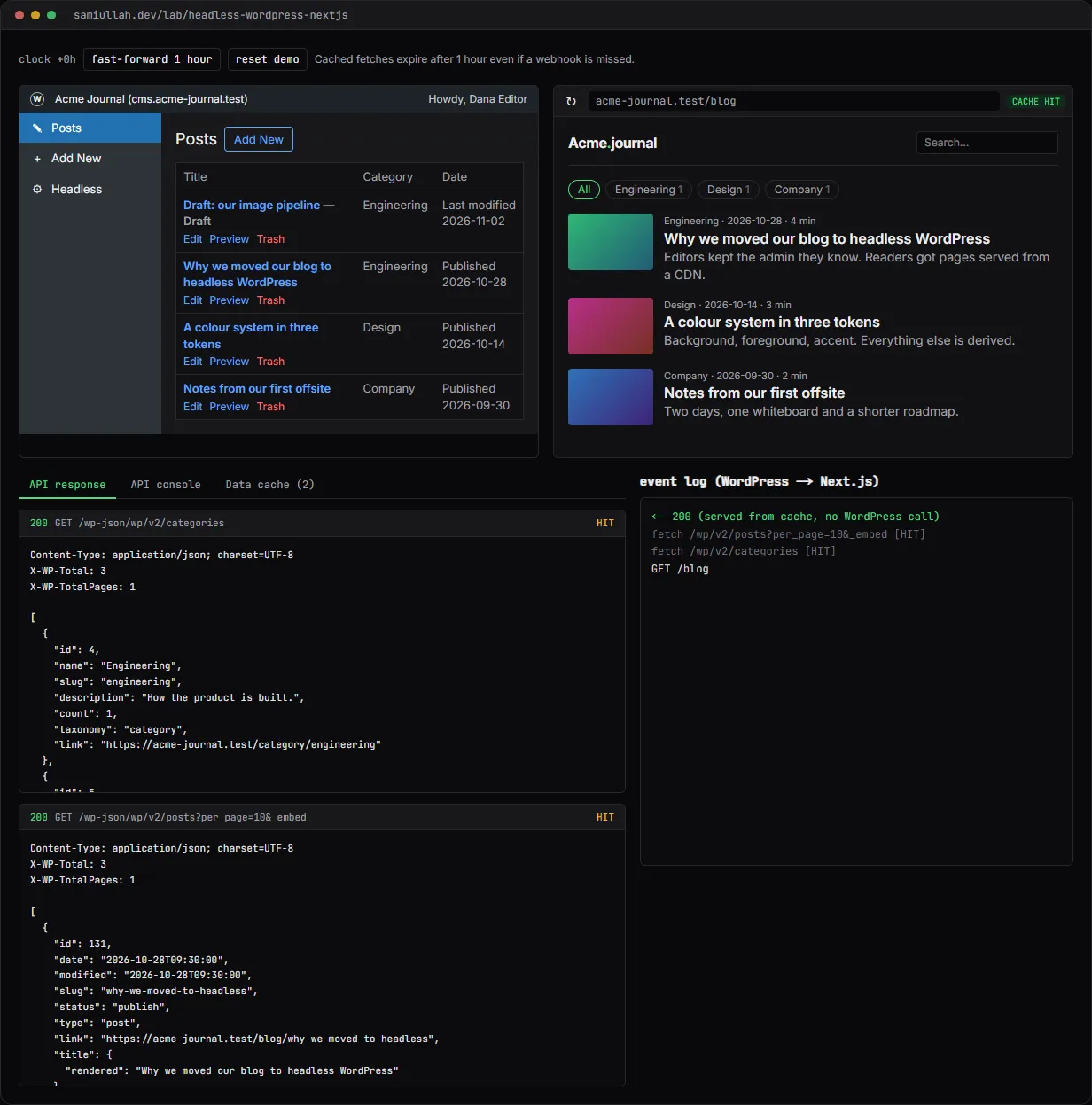
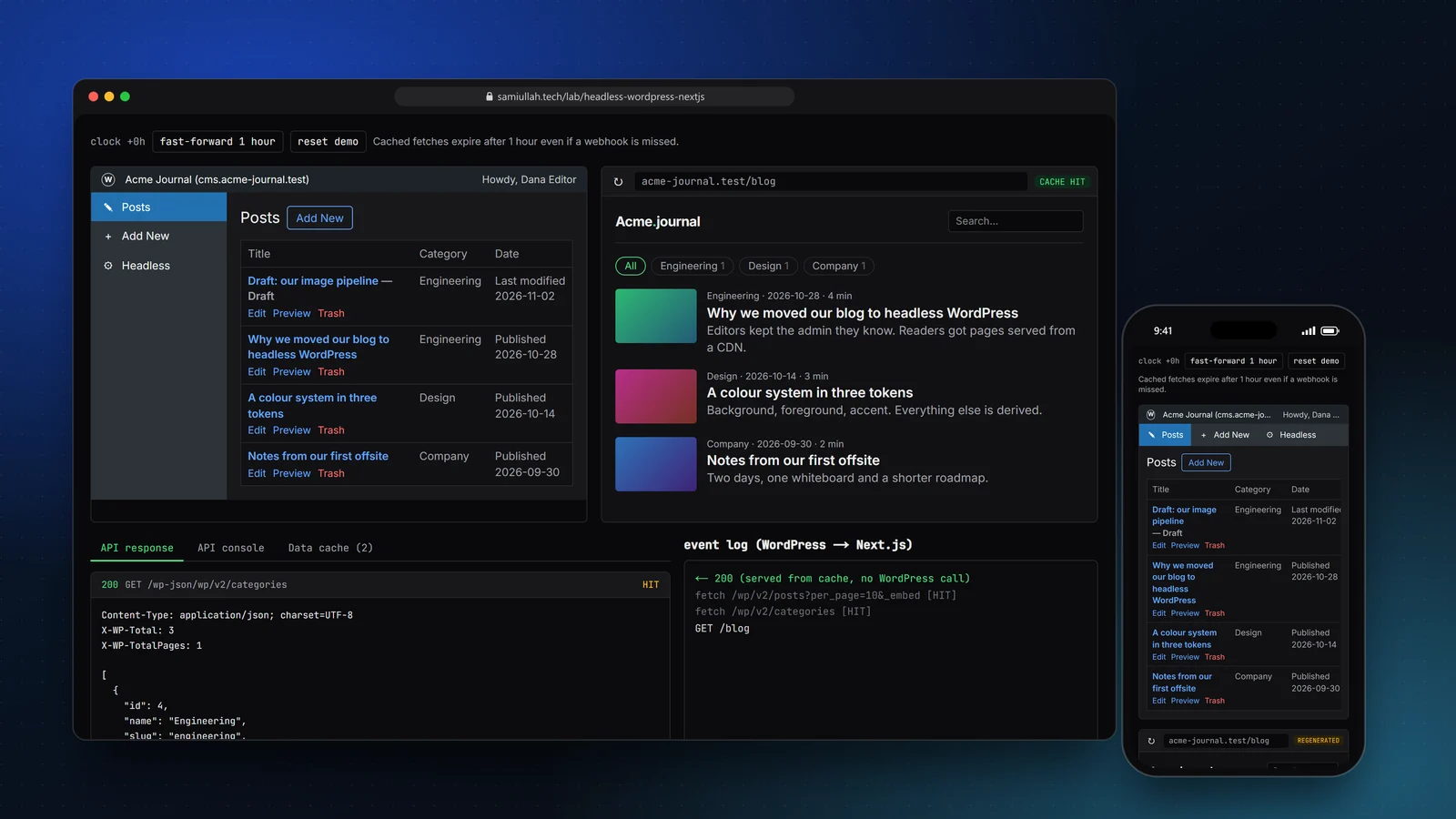
A concept project with a working demo: editors write in WordPress, readers get a Next.js site. Publishing a post fires a webhook that purges tagged cache entries, drafts open through Draft Mode, and ACF fields come through the REST API. The demo simulates both sides in the browser and shows every REST response.
Overview#
Headless WordPress means WordPress keeps the editing and a separate front end serves the pages. Editors keep the admin they know. Readers get static pages from a CDN. The hard parts are not fetching posts; they are keeping the cache fresh when an editor presses Publish, letting editors preview drafts, and not leaking drafts to the public.
The live demo shows both halves side by side: a mini wp-admin on the left, the Next.js front end on the right, and an inspector underneath with the raw REST responses, the data cache and an event log of everything that crosses between them.
My role#
Everything: the API module, the cache and webhook design, the WordPress plugin in PHP, the demo interface and this write-up. It is a concept project, not client work.
The problem#
A plain Next.js site with WordPress behind it usually ends up in one of two bad states:
- Too fresh. Every page request calls WordPress. That is a PHP request and several database queries per visit, and WordPress becomes the bottleneck again.
- Too stale. Pages are cached with a long timer. An editor fixes a typo, refreshes, sees the old text and files a bug.
What editors expect is simple: press Publish, see the change within seconds, and preview drafts before anyone else can see them.
Approach & architecture#
- wp-admin Publishthen
- transition_post_statusthen
- POST /api/revalidatethen
- revalidateTagthen
- next visit regenerates
- Visitorthen
- Next.js pagethen
- tagged fetch (cache HIT)then
- HTML
- tagged fetch (MISS)then
- /wp-json/wp/v2/posts?_embedthen
- cache store with tags
Tagged fetches. Each fetch in the Next.js app carries cache tags, defined in one place so the pages and the webhook agree on names:
export const tags = {
  posts: "wp:posts",
  post: (slug: string) => `wp:post:${slug}`,
  category: (id: number) => `wp:category:${id}`,
  categories: "wp:categories",
};
The list page fetches /wp/v2/posts?_embed tagged wp:posts. A post page fetches ?slug=… tagged wp:post:<slug>. _embed brings the author, featured image and terms in one request instead of three.
One hook for every change. In the production design a small plugin listens to transition_post_status. It fires on publish, update, unpublish and trash, so one callback covers all four. It only acts when the old or new status is publish, because draft edits do not change public pages.
add_action( 'transition_post_status', 'acme_headless_notify', 10, 3 );

function acme_headless_notify( string $new_status, string $old_status, WP_Post $post ): void {
	if ( 'post' !== $post->post_type || wp_is_post_revision( $post ) ) {
		return;
	}
	if ( 'publish' !== $new_status && 'publish' !== $old_status ) {
		return;
	}
	wp_remote_post( trailingslashit( ACME_FRONTEND_URL ) . 'api/revalidate', array(
		'headers'  => array( 'Content-Type' => 'application/json', 'x-revalidate-secret' => ACME_REVALIDATE_SECRET ),
		'body'     => wp_json_encode( array(
			'post_id'    => $post->ID,
			'slug'       => $post->post_name,
			'old_status' => $old_status,
			'new_status' => $new_status,
			'categories' => wp_get_post_categories( $post->ID ),
		) ),
		'blocking' => false,
	) );
}
The request is non-blocking, so the editor never waits on the front end's host.
The revalidate route checks the shared secret, validates the body and purges four kinds of tag: the post, the list, the category archives and the category counts. In the demo, revalidateRoute in next-site.ts is that handler, and the Data cache tab lets you watch entries disappear.
ACF in REST. The custom fields (subtitle, reading time, a table-of-contents switch) are registered in PHP with acf_add_local_field_group and show_in_rest, so they live in version control and arrive under acf in the post JSON.
Key challenges#
- Drafts must never reach the public cache. Draft Mode bypasses the cache entirely and fetches with credentials. In the demo, try
/wp/v2/posts?status=draftin the API console without the application password: you get the same400 rest_invalid_paramWordPress returns. - Lost webhooks. Networks fail. Every tagged fetch also has a one-hour
revalidate, so the worst case is an hour of staleness, not forever. The demo has a clock to fast-forward and a switch to turn the webhook off. - Previews from the WordPress button. The
preview_post_linkfilter points the editor's Preview button at the Next.js/api/previewroute with a secret and the post id. The route checks the post exists, enables Draft Mode and redirects. - Untrusted HTML. Post content is HTML. It is passed through an allow-list sanitiser before rendering, so stored markup cannot add scripts or event handlers.
- The old theme front end. A
template_redirecthook sends any theme request to the same path on the Next.js domain with a 301, so search engines see one site.
Tech stack#
- Demo: TypeScript, React and Next.js.
wp-api.tsis a mock of the WordPress REST API with core's response shapes, headers (X-WP-Total) and error codes.next-site.tsmodels the tagged data cache and the two route handlers. State is saved inlocalStorage. - Production design: WordPress with a small PHP plugin (shown in the demo's source), ACF for custom fields, the built-in REST API, and a Next.js App Router site on Vercel using
fetchtags,revalidateTagand Draft Mode.
Results#
- A working simulation of the full publish loop: edit, publish, webhook, tag purge, regenerated page, with each step written to the event log.
- Previews of drafts that stay out of the cache, and an exit button that returns to the public view.
- A REST console that returns the same JSON shapes and error codes as core WordPress, including
_embed, pagination headers andacf. - The production plugin is written out in PHP and listed under "View source" on the demo page.
This is a concept build; there is no deployed WordPress install or real readership behind it.
Try the demo#
Open the headless WordPress demo. Things to try:
- Load the blog, then reload it: the badge changes from REGENERATED to CACHE HIT. Edit a post title, press Update, and see only that post's tags purged.
- Press Preview on the draft post. The yellow bar shows Draft Mode; exit it and the draft URL returns 404.
- In Headless settings change the secret, publish something, and read the
401in the event log. - In the API console, send
/wp/v2/posts?per_page=500and/wp/v2/pagesto see WordPress-style errors.
What I would do next#
- Run it against a real WordPress install in Docker, with Playwright tests that publish a post and assert the page changes.
- Sign the webhook body with HMAC and a timestamp instead of a static header, to stop replays.
- Add a sitemap and RSS route in Next.js that use the same
wp:poststag.