Concept project
Multi-step Form Builder with React and zod
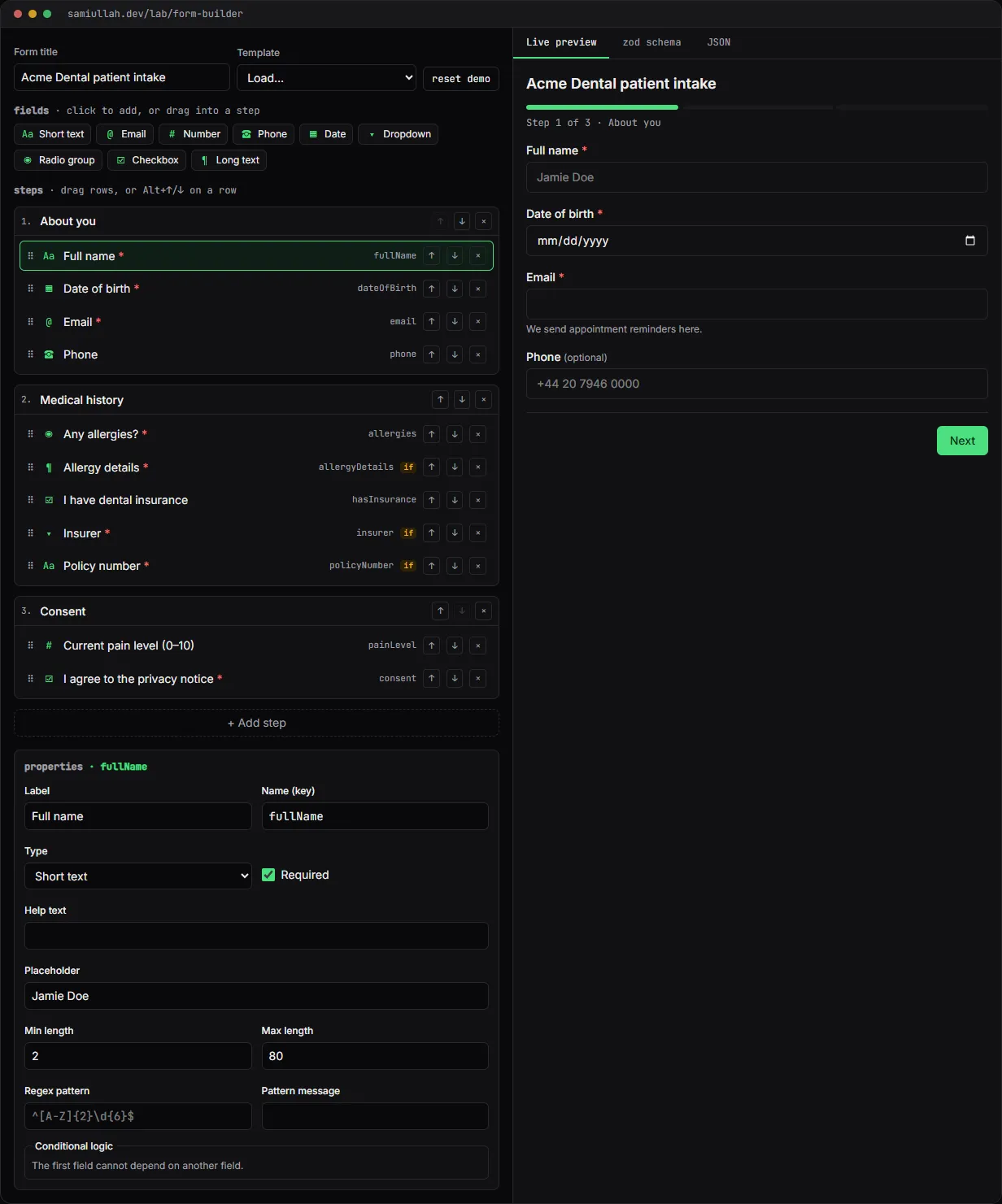
A concept project with a working demo: a multi-step form builder in React. You add and drag fields, set validation rules and conditional logic, and fill in a live preview that is validated by a zod schema generated from the form definition. The same definition exports as JSON and as copyable zod code.
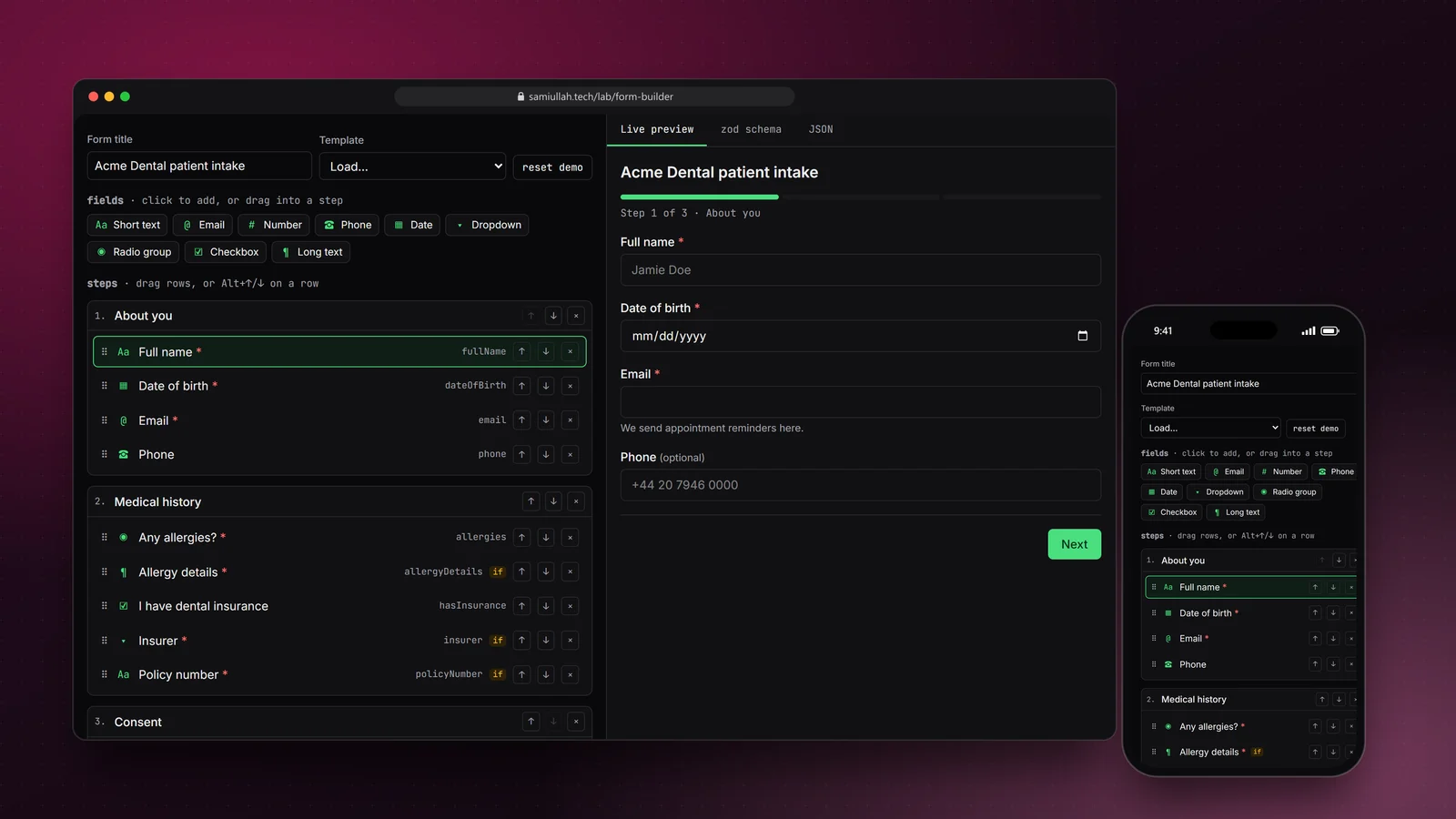
Overview#
Forms are where most web apps lose people: a rule that fires too late, an error nobody can see, a field that should not have been there. A form builder makes this harder, because the rules are data that someone else types in, not code I wrote.
This concept is a working builder. In the live demo you design a multi-step form, set rules and conditions, and fill it in right away. The preview is validated by a zod schema generated from your definition, and you can copy that schema as TypeScript or export the whole form as JSON.
My role#
Everything: the definition format, the schema generator, the code generator, the editor, the preview and this write-up. It is a concept project, not client work. The three starter templates use fictional organisations such as "Acme Dental".
The problem#
A builder like this usually ends up with two sets of rules that drift apart:
- the rules the browser checks while someone fills the form in, and
- the rules the server checks when the submission arrives.
When they differ, people either get blocked by a rule they never saw, or bad data gets stored. Conditional fields make it worse. "Policy number" is required, but only if "I have insurance" is ticked. If the hidden field is still validated, the form cannot be submitted at all.
I wanted one definition to be the single source of truth for the preview, the server and the exported code.
Approach & architecture#
- FormDef (steps + fields)then
- fieldSchema()then
- zod schemathen
- preview validation
- FormDef (steps + fields)then
- toZodSource()then
- TypeScript you can paste into an API
- FormDef (steps + fields)then
- JSON exportthen
- formDefSchema + lintDefthen
- import
The definition is plain data. Each field has a type, a key, a label, rules (required, min, max, pattern) and an optional showIf condition. Steps hold fields. Nothing in it is React-specific, so it could be stored in a database row as is.
Rules become zod at runtime. fieldSchema() maps one field to a zod schema. Optional fields accept an empty string or a value that passes the rules, which is how real inputs behave:
default: {
  // text, textarea, tel
  let s = z.string().trim();
  if (f.min !== null) s = s.min(f.min, `${f.label} needs at least ${f.min} characters.`);
  if (f.max !== null) s = s.max(f.max, `${f.label} can be at most ${f.max} characters.`);
  const pattern = f.pattern || (f.type === "tel" ? DEFAULT_TEL : "");
  const re = pattern ? safeRegex(pattern) : null;
  if (re) s = s.regex(re, f.patternMessage || "The format is not valid.");
  return f.required ? z.string().trim().min(1, req).pipe(s) : z.literal("").or(s);
}
Only visible fields are validated. The step schema is built per render from the fields whose condition is true right now:
export function stepSchema(step: Step, values: Values) {
  const shape: Record<string, ZodTypeAny> = {};
  for (const f of step.fields) if (isVisible(f, values)) shape[f.name] = fieldSchema(f);
  return z.object(shape);
}
On the final submit every step is parsed again, which also coerces numbers and drops hidden answers. The JSON you see on the success screen is what an API would receive.
The same rules as code. toZodSource() writes the definition as TypeScript: one z.object per step, merged together. Conditional fields are .optional() in the object and enforced in a superRefine, so the exported schema behaves like the preview.
Key challenges#
- Useful error messages from unions.
z.literal("").or(rule)reports "Invalid input" by default. The validator looks inside the union and shows the rule's own message, such as "Two capital letters then six digits". - Accessible errors. On Next, the first invalid input gets focus, a summary is announced, and each message is linked to its input with
aria-describedby. Required fields are marked visually and witharia-required. - Rules that users type. A user can type an invalid regex, make two fields with the same key, or make a field depend on one that comes after it.
lintDef()reports all of these in the editor instead of letting the preview crash. - Trusting imported JSON. Imports go through
formDefSchema, a zod schema for the definition itself, before anything renders. A broken file gives a message with the exact path, such assteps.0.fields.2.type. - Drag and keyboard. Fields can be dragged from the palette into any step, or reordered by drag. The same moves are available with Alt+Arrow keys and the arrow buttons on each row.
Tech stack#
- Demo: TypeScript, React 19, Next.js and zod 3. No form library: the preview is controlled inputs plus the generated schema. Definitions persist in
localStorage, draft answers insessionStorage. - Production design: the same definition format stored as versioned rows in PostgreSQL, a NestJS endpoint that rebuilds the schema from the stored version and validates submissions server side, and React Hook Form with a zod resolver on larger forms.
Results#
- A working builder with nine field types, steps, length, range and regex rules, conditional logic, three templates, JSON import and export, and generated zod code.
- The preview and the exported schema are produced from the same definition, so a rule cannot exist in one and not the other.
- Hidden conditional fields are never validated and never submitted.
- The full source is visible under "View source" on the demo page.
This is a concept build without real users, so I have no completion-rate or usage numbers.
Try the demo#
Open the form builder demo. Things to try:
- Press Next on the first step without filling anything in. Focus jumps to the first error.
- On step 2, tick "I have dental insurance" and watch two new required fields appear. Untick it and they stop blocking you.
- Select "Policy number", change its regex, then open the zod schema tab to see the change.
- Open JSON, press "paste current", break the
typeof a field and press Import.
What I would do next#
- Add Vitest tests that generate a schema for every field type and rule and compare it with the generated source.
- Store versioned definitions and submissions in PostgreSQL behind a NestJS API.
- Add more condition operators (greater than, one of) and conditions on whole steps.
- Add undo, since the editor has many small destructive actions.