Concept project
Restaurant Ordering and Kitchen Display System
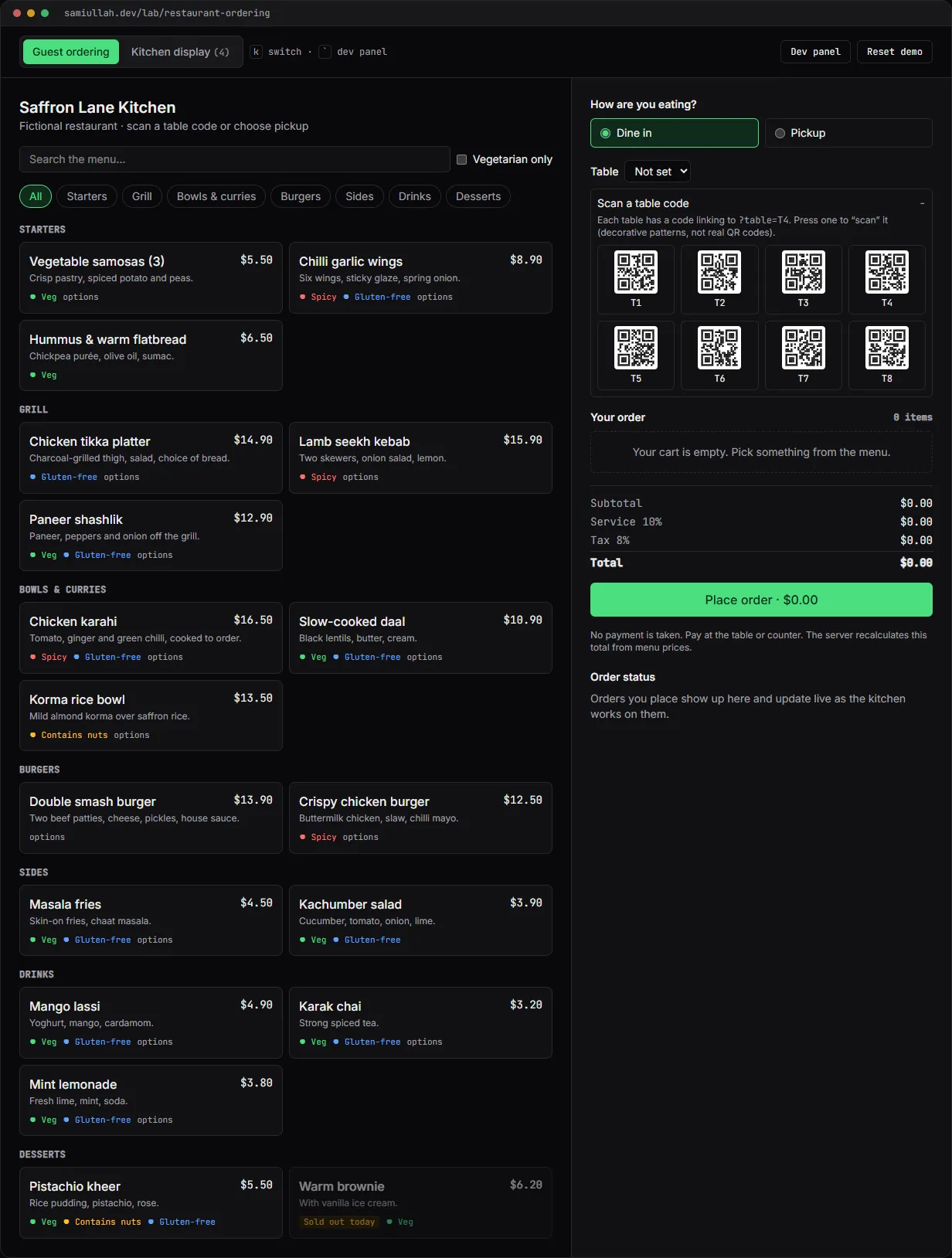
A concept project with a working demo: table ordering for a fictional restaurant. Guests scan a table code, choose sizes, extras and kitchen notes, and place an order the server re-prices. Kitchen staff move tickets across a live board while the guest's tracker follows. A dev panel shows the NestJS and PostgreSQL calls each step would make.
Overview#
Most small restaurants take orders on paper or through a delivery platform that keeps a cut. The ordering itself is not complicated, but it has a few places where a naive build goes wrong: prices with options, two screens changing the same order, and a guest tapping "Place order" twice on a slow connection.
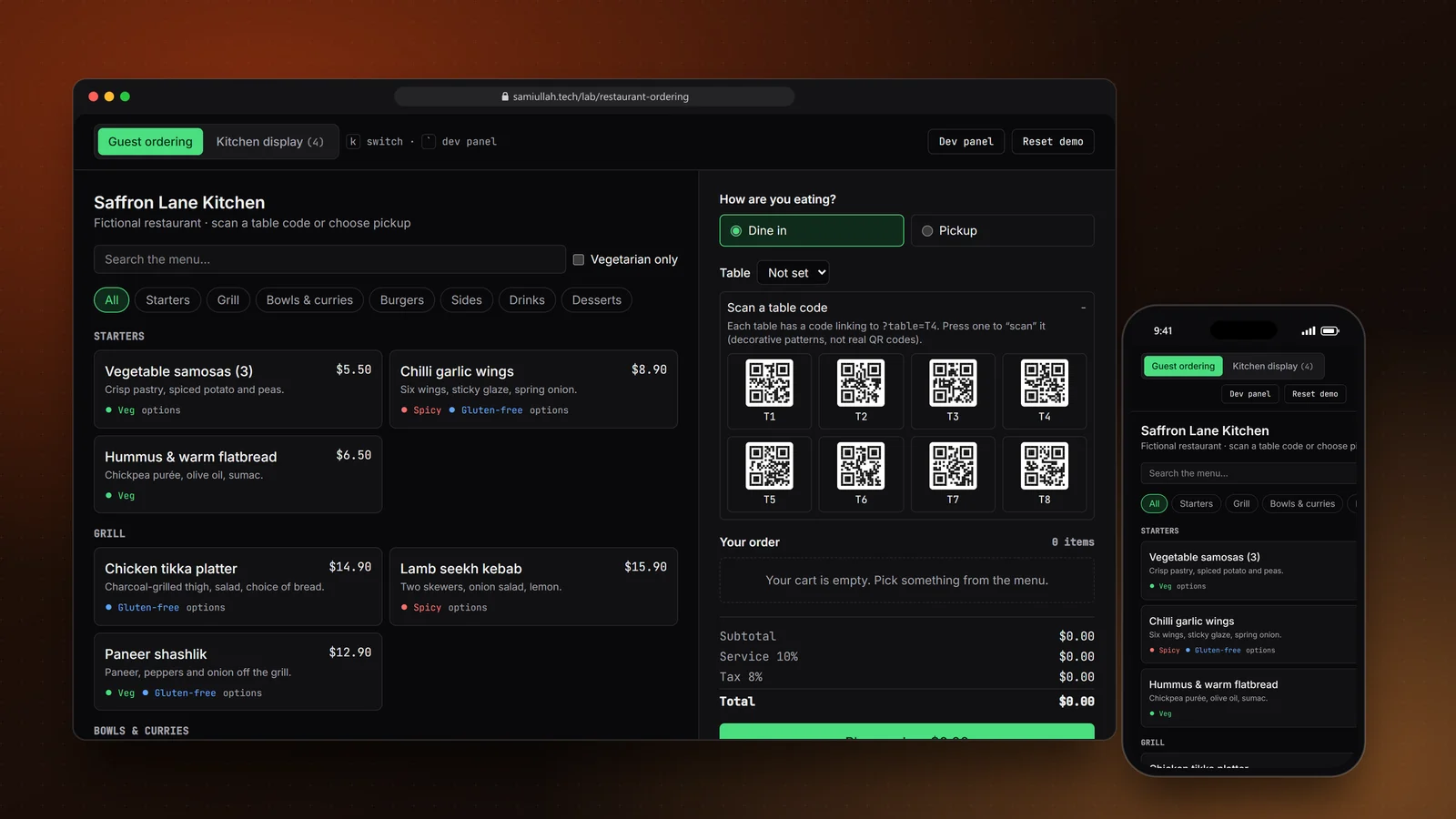
This concept is a table-ordering system for a fictional restaurant, Saffron Lane Kitchen. The live demo has two screens: a guest menu and a kitchen display. Both run in your browser against an in-browser API layer that behaves like the NestJS service it stands in for, and a dev panel shows every request with the SQL it would run.
My role#
I did all of it: the data model, the API rules, the guest and kitchen interfaces, and this write-up. It is a concept build, not client work. The restaurant, menu and orders are made up.
The problem#
A restaurant ordering system has three users with different needs:
- The guest is on a phone, often one-handed, and wants to order without waiting for staff. They need clear prices, required choices that are obvious (spice level, bread), and a way to see that the kitchen got the order.
- The kitchen needs a screen that shows what to cook next, how long each ticket has waited, and every modifier and allergy note. It has to update without anyone pressing refresh.
- The owner needs the totals to be right. A price shown in the browser is a suggestion; the amount on the bill must come from the menu in the database.
Approach & architecture#
- Scan table codethen
- Menu + item optionsthen
- Cart (preview prices)then
- POST /api/ordersthen
- 201 + order number
- Kitchen boardthen
- PATCH /api/orders/:id/status (version)then
- UPDATE ... WHERE version = $3then
- NOTIFYthen
- guest tracker
One pricing function, called twice. Items have option groups with a min and max. A group with min: 1, max: 1 is a required single choice and renders as radio buttons; max: 3 renders as checkboxes that stop at three. The same unitPrice function prices the cart preview and the real order:
export function unitPrice(item: MenuItem, optionIds: string[]): number {
  let p = item.price;
  for (const g of item.groups) for (const o of g.options) if (optionIds.includes(o.id)) p += o.price;
  return p;
}
The browser still sends a unitPrice per line, because a real client might. The API never reads it. In the demo you can tick "send tampered prices" in the dev panel; the order still comes back with the correct total and the log notes that the client price was ignored.
A transaction per order. POST /api/orders validates the body with a zod schema (in the production design, a class-validator DTO behind Nest's ValidationPipe). Dine-in orders need a table, pickup orders need a name. Then it re-prices each line, checks option groups, and writes everything at once:
BEGIN;
SELECT order_id FROM idempotency_keys WHERE key = $1;
SELECT id, price, sold_out FROM menu_items WHERE id = ANY($2) FOR SHARE;
INSERT INTO orders (mode, table_code, customer, subtotal, service, tax, total, status)
  VALUES ($3, $4, $5, $6, $7, $8, $9, 'new') RETURNING id, version;
INSERT INTO order_lines (order_id, item_id, qty, unit_price, note) VALUES (...);
INSERT INTO order_events (order_id, status) VALUES ($10, 'new');
INSERT INTO idempotency_keys (key, order_id) VALUES ($1, $10);
COMMIT;
SELECT pg_notify('kitchen', '{"event":"order.created","id":1045}');
FOR SHARE on the menu rows means an item cannot be marked sold out halfway through someone's checkout. If it was sold out before, the guest gets a 409 that names the item.
The table QR flow. Each table code links to the ordering page with ?table=T4. The page reads the parameter, sets dine-in mode and shows "ordering for table T4". In the demo the codes are decorative patterns you press to "scan"; a real code would carry a signed URL so nobody can order to a table they are not at.
Key challenges#
- Double submits. On a slow network people tap twice. Every checkout carries an
Idempotency-Key. The first request stores the key with the new order id inside the same transaction; the second finds it and returns the original order with200. In the demo, press "Place order" twice quickly and the dev panel shows a201followed by a replayed200, and only one ticket reaches the kitchen. - Two screens, one order. A busy kitchen often has a cook screen and an expo screen. The status update includes the version the screen rendered:
UPDATE orders SET status = $2, version = version + 1 WHERE id = $1 AND version = $3. If another screen moved the order first, no row matches and the API returns409instead of overwriting. - A state machine, not free text. Orders move one step at a time, forwards or one back to undo a mis-tap. Jumping from New to Served is rejected with
422before any SQL runs. - Kitchen tickets that are easy to read. Each card shows quantity, modifiers and the guest's note in a warning colour, plus a timer since the order was placed. Tickets waiting more than 15 minutes get a red border.
- Accessible drag and drop. Tickets can be dragged between columns, but every move also has a button and a keyboard path: focus a ticket and press the arrow keys. The options dialog is a native
<dialog>, so focus is trapped while it is open, Escape closes it, and focus returns to the item that opened it.
Tech stack#
- Demo: TypeScript, React and Next.js, zod for the request schema, Tailwind CSS. The API lives in
api.tsand the data and pricing rules indb.ts, both free of React, so they read like the server code they stand in for. State persists inlocalStorage. - Production design: a Next.js guest app with the menu statically rendered and revalidated when the kitchen marks something sold out; a NestJS API with an orders module, a
RolesGuardfor kitchen endpoints and a WebSocket gateway; PostgreSQL for menu, orders, order events and idempotency keys, withLISTEN/NOTIFYfeeding the gateway.
Results#
- A working guest flow: search and filter the menu, configure items with required and optional groups, edit cart lines, and place dine-in or pickup orders with service charge and tax shown separately.
- A working kitchen display with four status columns, timers, drag, buttons and keyboard moves, a sold-out board, and a button that simulates incoming guests.
- The guest's order tracker updates as the kitchen moves the ticket.
- The rules in the API can be seen working in the dev panel: validation errors,
409for sold-out items, idempotent retries, server-side re-pricing, the role guard and optimistic locking.
This is a concept build without real users, so there are no traffic or sales numbers.
Try the demo#
Open the restaurant ordering demo. Things to try:
- Press table T4 under "Scan a table code", add a chicken karahi with a large size and a note, and place the order.
- Switch to Kitchen display (or press
k) and move your ticket to Ready. Switch back and check the tracker. - Open the Dev panel, tick "send tampered prices" and place another order. The total is still correct.
- In the kitchen's availability list, mark an item that is in your cart as sold out, then try to check out.
What I would do next#
- Move
api.tsinto real NestJS controllers with integration tests against a PostgreSQL test database, including a test that fires two status updates with the same version. - Add payment at the table with a hosted checkout, and a printed or emailed receipt.
- Add prep-time estimates per item so the tracker can show an expected ready time.
- Sign table URLs so an order can only be sent to a table the guest is actually sitting at.